
How to: Add Rayls to your Web3 Wallet
To interact with the Rayls Public Chain and the services that run on the chain you will need a web3 wallet.
There are many on the market, such as Rabby, OKX and Phantom. The choice of wallet is ultimately yours, although the wallet you choose must allow you to add a custom network (which is not possible with certain versions of Coinbase's Base wallet). The Rayls recommendation is MetaMask, and while mobile versions of wallets are supported, Rayls is best used on a desktop device with a desktop wallet.
How to add Rayls to MetaMask
-
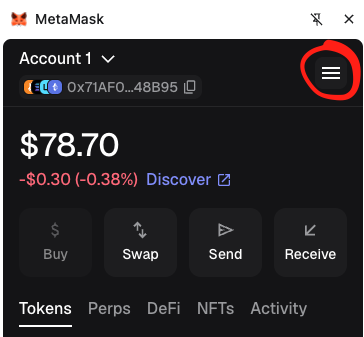
Select the menu icon in the top right:
-
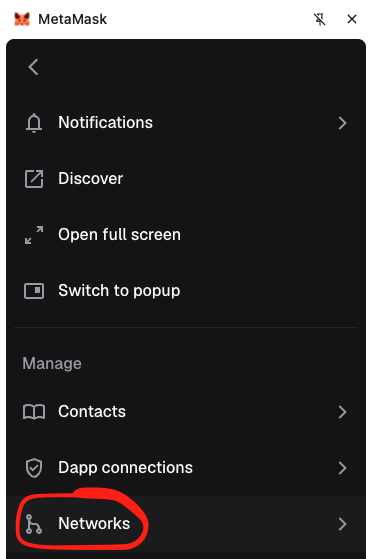
Select "Networks":
-
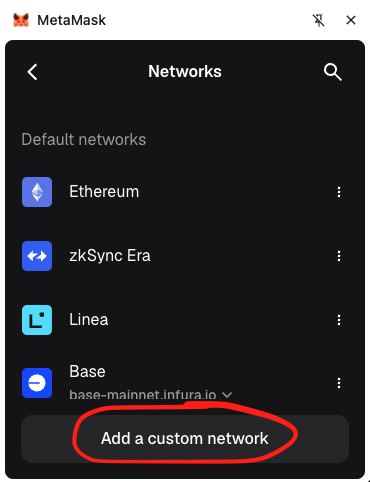
Select "Add a custom network":
-
Enter the below details into the form and then select "Save":
| Network | Chain ID | RPC Endpoint | Explorer | Gas Token |
|---|---|---|---|---|
| Rayls Mainnet | 72957 | https://mainnet-rpc.rayls.com/ | https://explorer.rayls.com/ | USDr |
Updated about 2 months ago
Did this page help you?