
How to: Get $BRL1.p
$BRL1.p is $BRL1, the Brazilian real stablecoin, bridged from Polygon to the Rayls Public Chain. It lets you use Brazilian reais in apps on Rayls, and you can redeem it for $BRL1 on Polygon at any time.
Getting $BRL1.p takes two steps:
- Get $BRL1 on Polygon, from an exchange or a decentralised exchange (DEX).
- Bridge it to Rayls at dapp.rayls.com/brl1p.
Use a standard walletUse a standard EVM wallet with an Externally Owned Account (EOA), such as MetaMask, Rabby, OKX Wallet, Phantom or Coinbase Wallet. Do not use a Smart Wallet such as Base, because your funds will otherwise be inaccessible on Rayls.
What is $BRL1?
$BRL1 is a stablecoin pegged 1:1 to the Brazilian real (BRL). It is issued on Polygon by a consortium of Brazilian crypto and financial firms: Mercado Bitcoin, Foxbit, Bitso and Cainvest. Each $BRL1 is backed by reserves of reais and Brazilian government bonds, and the consortium publishes audited proof-of-reserves reports. See brl1.io for the whitepaper and the latest reserve report.
What is $BRL1.p?
$BRL1.p ("Bridged BRL1 (Polygon)") is $BRL1 bridged from Polygon to the Rayls Public Chain with LayerZero. When you bridge, your $BRL1 is held in the Rayls bridge vault on Polygon, and the same amount of $BRL1.p is minted to your address on Rayls. When you redeem $BRL1.p, the vault releases the same amount of $BRL1 to you on Polygon.
Every $BRL1.p is backed 1:1 by $BRL1 in the vault. The bridge page shows the vault's $BRL1 balance next to the amount of $BRL1.p in circulation, and anyone can check the vault onchain (see Token addresses).
$BRL1.p is created by the Rayls bridge. $BRL1 itself is issued by the BRL1 consortium.
What you need
- A wallet with Polygon and Rayls added. Polygon is built into most wallets. To add Rayls, see How to: Add Rayls to your Web3 Wallet.
- $POL on Polygon, to pay gas for swaps and the bridge's network fee. The bridge page shows the fee before you confirm.
- A little $USDr on Rayls, to pay gas when you move or redeem $BRL1.p. See How to: Get the $USDr Gas Token.
Step 1: Get $BRL1 on Polygon
You can buy $BRL1 on an exchange and withdraw it to your wallet, or swap another token for it on a DEX.
Option A: Buy on an exchange
The BRL1 consortium lists these exchanges on brl1.io:
| Exchange | Where to buy |
|---|---|
| Mercado Bitcoin | mercadobitcoin.com.br |
| Bitso | bitso.com |
| Foxbit | foxbit.com.br |
| Kraken | kraken.com |
| OKX | okx.com |
Each exchange has its own sign-up and verification checks, and may not be available in your country.
- Create an account on the exchange and complete its verification.
- Deposit funds. Depending on the exchange, $BRL1 trades against reais, US dollars or $USDT.
- Buy $BRL1.
- Withdraw the $BRL1 to your wallet address. When the exchange asks for a network, choose Polygon: $BRL1 is a Polygon token. Send a small test amount first.
- Check your wallet on the Polygon network. If $BRL1 doesn't appear, import it with its token contract,
0x5C067C80C00eCd2345b05E83A3e758eF799C40B5.
Option B: Swap on a DEX
If you already hold tokens on Polygon, you can swap them for $BRL1. Most $BRL1 liquidity on Polygon is in Uniswap pools paired with $USDT and $USDC, so swapping from one of those usually gets the best price. The aggregators below find a route through those pools for you.
| DEX | Type | Link |
|---|---|---|
| Uniswap | DEX that holds the main $BRL1 pools | app.uniswap.org |
| MetaMask Swaps | Aggregator built into MetaMask | metamask.io/swaps |
| OKX Wallet | Aggregator in the OKX Web3 wallet | web3.okx.com |
| KyberSwap | Aggregator | kyberswap.com |
| Velora (formerly ParaSwap) | Aggregator | app.velora.xyz |
Swap on Uniswap
- Open Uniswap and connect your wallet. The link opens a swap on Polygon with $BRL1 selected as the token to buy.
- Check that the network is Polygon.
- Under Sell, choose the token you're swapping from, such as $USDT or $USDC, and enter the amount.
- Under Buy, check that the token is BRL1 with the contract
0x5C067C80C00eCd2345b05E83A3e758eF799C40B5. If Uniswap shows a warning about the token, compare the address before you continue. - Review the swap and confirm it in your wallet. The first time you sell a token, your wallet asks you to approve it first.
Swap with MetaMask Swaps
- In MetaMask, switch to the Polygon network.
- Select Swap.
- Choose the token you're swapping from, then search for BRL1 as the token to receive. Check that its contract is
0x5C067C80C00eCd2345b05E83A3e758eF799C40B5. - Enter the amount, review the quote and confirm.
The other aggregators work the same way: choose Polygon, pick the token you're swapping from, paste the $BRL1 contract address as the token to receive, and confirm.
Step 2: Bridge $BRL1 to $BRL1.p
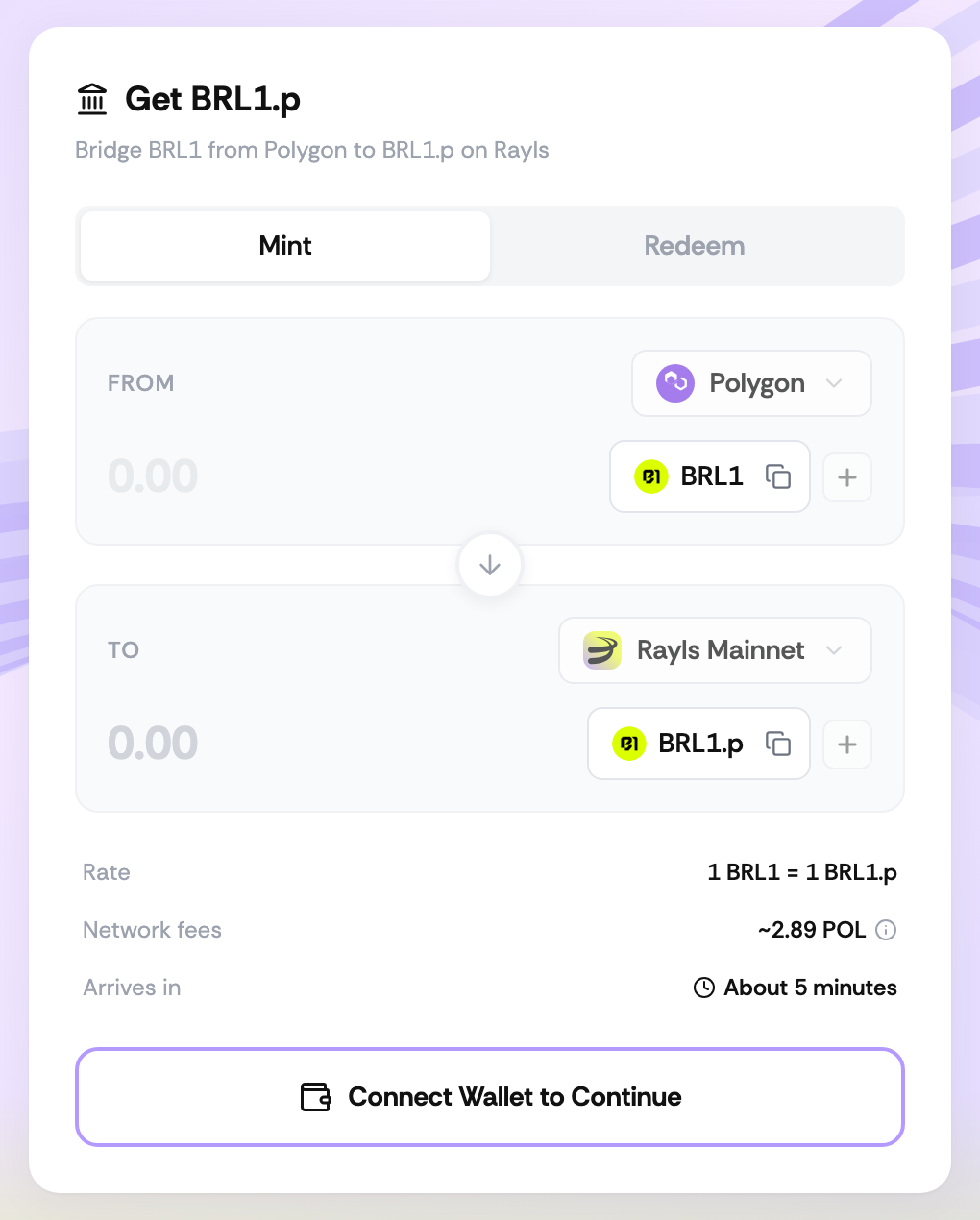
- Go to dapp.rayls.com/brl1p and select Connect Wallet.
- On the Mint tab, check that you're bridging from Polygon ($BRL1) to Rayls Mainnet ($BRL1.p).
- Enter the amount of $BRL1 to bridge. You receive the same amount of $BRL1.p: the rate is 1:1.
- Check the network fee, paid in $POL on Polygon, and the estimated arrival time.
- Confirm in your wallet. Your wallet may ask you to approve $BRL1 for the bridge first.
- Your $BRL1.p arrives at the same address on Rayls Mainnet, usually in about 5 minutes. To see it in your wallet, select + (Add token to wallet) next to BRL1.p on the bridge page, or import its token contract,
0xA069d3798FEAb32994aC5D98A9F011DA6024f334.
Redeem $BRL1.p for $BRL1
- Go to dapp.rayls.com/brl1p, connect your wallet and select the Redeem tab.
- Enter the amount of $BRL1.p to redeem.
- Check the network fee, paid in $USDr on Rayls, and confirm in your wallet.
- Your $BRL1 arrives at the same address on Polygon, usually in about 2 minutes.
Token addresses
| Token | Network | Contract | Add to wallet |
|---|---|---|---|
| $BRL1 | Polygon | 0x5C067C80C00eCd2345b05E83A3e758eF799C40B5 | |
| $BRL1.p | Rayls Mainnet | 0xA069d3798FEAb32994aC5D98A9F011DA6024f334 |
Both tokens use 18 decimals. The Add to MetaMask buttons switch MetaMask to the token's network, adding Rayls Mainnet if it isn't there yet, and then ask you to add the token. They also work with other browser wallets that support adding tokens, such as Rabby.
The $BRL1 bridge vault on Polygon is 0x3Ea6BaC7d4138BcC126D0F17aE10122B3620abA6.
Updated 13 days ago